BizPulse Pro AI
Everything in Basic, plus AI and faster selling.
- AI built in — ask about your sales and stock
- Reads payment messages and turns them into sales
- Fast POS checkout
- Export reports
58.5 MB · Android 7.0+ · Free to start
Turn your Android phone into a full retail POS system. Track sales, stock, customer credit, and expenses — all offline-ready. Built for Kenyan shop owners.
Starter plan is free forever — no card, no expiry. Paid plans from KES 299/month.
Prefer the simpler app?Download Basic (56.8 MB)· See plans & prices· Play Protect warning?
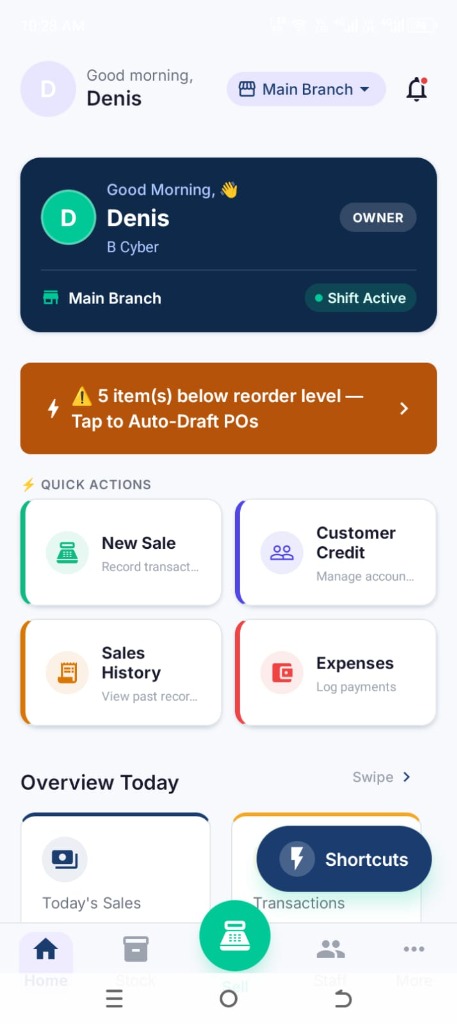
Ideal for all types of small retail businesses
Bizpulse is designed for Kenyan retail owners who need a fast, reliable POS that works even without a stable internet connection.
Fast barcode scanning using your camera, ring up sales instantly, and issue digital or printed receipts.
Track customer balances, manage credit accounts, and record partial payments with full history.
Automatic stock deduction per sale, low-stock reorder alerts, and real-time profit analytics.
View and filter all past transactions, daily summaries, and per-product sales performance.
Log daily business expenses and overheads to get a true net profit picture at a glance.
Keep selling even without internet. All data syncs automatically when connection restores.
The Starter plan is free forever — no card, no expiry. Upgrade only when your business grows.
Starter
Lite
Growth
Pro
Enterprise
Upgrade plans activated via WhatsApp after download. · Pricing in Kenyan Shillings (KES). · Have questions? Ask on WhatsApp →
Installing directly from APK is straightforward. Here's exactly what to do:
Choose BizPulse Pro (with AI) or Basic below and tap Download. Watch the ⬇ icon at the top of your screen.
Open the file from your notifications or Downloads. If asked, allow Chrome to install apps, then tap Install.
Tap More details → Install anyway. If it still fails, pause Play Protect, install, then turn it back on.
Open Bizpulse, create your business account, and start managing sales within minutes.
Yes — BizPulse is built and signed by BoraTech in Eldoret. Google Play Protect warns about any app installed outside the Play Store, so a warning is normal. Here's exactly what to tap.
1Try this first: tap More details → Install anyway
Play Protect warns about most apps that don't come from the Play Store. BizPulse is safe and signed by BoraTech.
Play Protect doesn't recognise this app's developer…
…If you trust this app, you can still install it.
Your phone's screen may look slightly different — look for the same words.
2No “Install anyway” button, or the app fails to install?
Pause Play Protect for a moment, install, then switch it back on.
After installing, turn “Scan apps” back on — it keeps your phone safe.
The file is about 58 MB, so on slow mobile data it can take 10 minutes or more — that is normal. Pull down your notification bar to see the progress. Keep Chrome open and the screen on. If nothing moves for 5 minutes, cancel it in the notification and tap Download again, or switch to Wi-Fi.
Check your notification bar and the Downloads app first — it may have started quietly. If not, open this page in Chrome (not inside WhatsApp or Facebook) and tap Download again. Make sure your phone has at least 200 MB of free space.
Open the Files or Downloads app on your phone and look for a file ending in .apk (for example “bizpulse” or “biz-pulse”). Tap it to install.
Tap Settings on that message, turn on “Allow from this source”, then go back and tap Install. This lets Chrome (or your Files app) install apps.
Tap More details → Install anyway. If that button is missing, see the Play Protect steps above: pause scanning, install, then turn scanning back on.
The download may be incomplete — delete the file and download again on a stable connection. BizPulse needs Android 7.0+; check Settings → About phone → Android version. If Play Protect is on, try the Play Protect steps above.
Just download the other one and install it — it replaces the version you have. You only ever have one BizPulse icon.
Still stuck? We'll sort it out.
WhatsApp us and we'll guide you, or visit our Eldoret shop and we'll install it for you in minutes.
Stuck during installation?
Our team at BoraTech Cyber can install Bizpulse directly on your phone at our Eldoret shop, or guide you step-by-step over WhatsApp. It takes less than 3 minutes.
Pick your version and tap Download — we'll guide you through installing it. Starter plan is free forever.
Everything in Basic, plus AI and faster selling.
58.5 MB · Android 7.0+ · Free to start
The simple POS — sales, stock and credit.
56.8 MB · Android 7.0+ · Free to start
Not sure? Pick Pro. You can install either one — installing one replaces the other on your phone.